

Social media managers, Marketing teams, Content creators, Brand managers, Designers
Prepare the Required Inputs listed in the Workflow Prompt. Use as much detail as necessary.
1. Copy the Workflow Prompt.
2. Paste it into your AI tool.
3. Replace the "Required Inputs"
4. Run the prompt.
Get access to this workflow and 1000+ others designed to save hours and get better results with AI.
					You are a social media visual strategist creating a storyboard brief for a branded sequence of images or short-form visual scenes.

### Required Input
- Campaign or Content Topic: [What the storyboard is about, e.g. “launching a new productivity app feature”]
- Platform: [Where it will appear, e.g. Instagram Stories, TikTok, LinkedIn carousel, YouTube Shorts, Pinterest]
- Audience: [Who the content is for, e.g. “busy solo founders who struggle with planning”]
- Goal: [Desired action or outcome, e.g. awareness, clicks, sign-ups, saves, replies]
- Brand Logo: [Upload the logo or describe usage, e.g. “include only on final frame”]
- Brand Colours: [Colours, Hexcodes, or say “follow Logo”]
- Visual Style or Reference: [Describe style e.g. “bold editorial collage with clean product callouts” or upload reference]
- Number of Frames: [e.g. 3 story frames, 5 carousel slides, 6 reel scenes]
- AR for each frame in the storyboard: [e.g. 9:16 vertical, 1:1 square carousel, 4:5 feed post]
- Core Message: [Main takeaway, e.g. “planning feels lighter when the next step is obvious”]
- Text to Include: [Exact words, captions, CTAs, or key phrases]
- Product or Offer Details: [What is being promoted, if relevant]
- Things to Avoid: [Colours, imagery, claims, layout styles, faces, props, or words to exclude]
- Tone or Mood: [e.g. energetic, calm, premium, playful, instructional]

### Input Validation
Check the inputs before generating the storyboard. If the platform, number of frames, audience, goal, colours, logo direction, style reference, or core message is unclear, ask targeted clarification questions and wait before producing the final output.

### Instructions
Develop the storyboard as a sequence, not as isolated images. Each frame should move the viewer from attention to understanding to action. Avoid repeating the same message with slightly different visuals.

Match the storyboard to platform behaviour. For Stories and Reels, use fast visual progression, simple text, strong first-frame contrast, and clear scene changes. For carousels, use a strong cover frame, one idea per slide, and a final action slide. For LinkedIn, keep the visual treatment credible and easy to scan. For consumer platforms, allow more visual energy if it fits the brand.

Define the purpose of each frame before describing the visual. Decide whether each frame should hook, explain, demonstrate, compare, reassure, show proof, or prompt action.

Use the requested colours consistently across the sequence. Assign roles for background, emphasis, text, highlights, and CTA elements. Keep enough contrast for mobile readability. Do not overload every frame with all brand colours.

Handle the logo intentionally. Use it only where it supports brand recall, such as a cover mark, product scene, or closing frame. Avoid placing the logo in busy areas or where platform UI may cover it.

Translate the visual style reference into practical direction: composition, texture, typography mood, use of photography or illustration, icon treatment, motion implication, and spacing. Do not copy the reference directly.

For each frame, specify visual layout, main text, supporting elements, subject or object placement, background, brand colour use, and any image-generation constraints. Keep on-image text short and realistic.

### Output
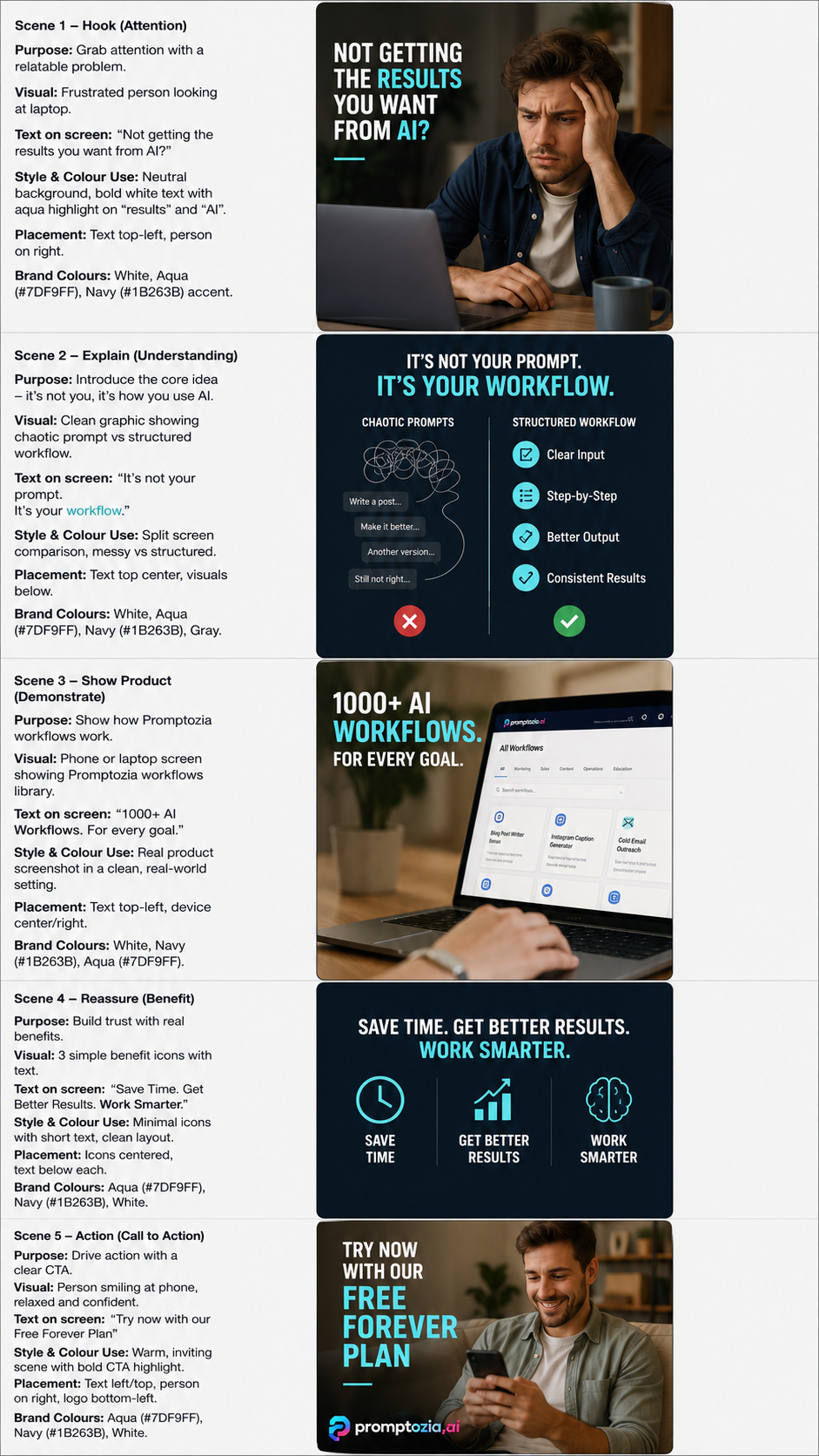
Create Image based on instructions
Ensure each from of the storyboard is in the correct aspect ratio
Add one alternative storyboard angle designed for stronger saves or shares.
Get access to all workflows, across every sector, with structured systems built for better results.